PowerHIL Studio,
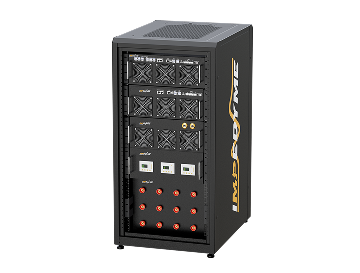
PowerHIL Studio is Impedyme's real-time simulation software environment for configuring, controlling, and automating 真硬件在环(Hardware-in-the-Loop, HIL) 与 电力硬件在环(PHIL) testing. It is the orchestration and automation layer that turns Impedyme's FPGA-based CHP 系列 hardware into a complete, software-driven test bench — the single workspace where power electronics engineers move a model from the desktop to real-time execution, exchange real voltage and current with a device under test, and run automated, repeatable validation campaigns. This page explains what PowerHIL Studio does, how it closes the validation gap between offline simulation and real hardware testing, and how it works across inverter, motor drive, battery, EV charging, grid, aerospace, marine, and data center applications.
What Is PowerHIL Studio?
PowerHIL Studio is a real-time simulation software environment built for engineers and researchers working on next-generation power systems. It configures the hardware, selects how and where models execute, launches purpose-built emulation applications, automates entire test campaigns, and captures the data that proves a design works. Where an offline simulator ends at a plot on a screen, PowerHIL Studio carries the same model forward into signal-level HIL and full-power PHIL, coordinating every element of the test bench from one interface.
In Impedyme's ecosystem, PowerHIL Studio is the connective tissue. It sits above the FPGA-based CHP Series hardware and beside the domain-specific studios — MotorSim Studio, BatterySim Studio, GridSim Studio与 DroneSim Studio — providing the automation and orchestration those workflows share. It integrates tightly with model-based design tools so a Simulink model becomes a real-time target, and it exposes the results through logging, scope, and reporting tools that make validation traceable.
Crucially, PowerHIL Studio is designed to be approachable. Engineers who are comfortable with model-based design and scripting can be productive without writing FPGA firmware by hand. The software handles system configuration, model deployment, and test sequencing, so the engineering effort goes into the test itself — not into the plumbing that connects a model to a machine.

PowerHIL Studio at a Glance
1
Configure the system
set IP addresses, firmware applications, FPGA or CPU processing modes, and parallel or slave configurations for multi-unit testing.
3
Automate with scripting
set parameters, run multiple test cases, capture measurements, and generate reports using loops, sweeps, and conditional logic.
4
Interact with live signals
control test timing, trigger events, and adjust parameters dynamically without interrupting a running simulation.
5
Capture waveforms with FPGA Scope
inspect signals at FPGA time resolution, log high-speed transients, and verify behavior without external instrumentation.
6
Integrate with model-based design
deploy models directly to real-time hardware, update parameters on the fly, and test scenarios instantly.
The Validation Gap: Why Offline Simulation Is Not Enough
Every power electronics program lives with a dangerous gap. On one side is offline simulation — fast, safe, and cheap, but built on idealized assumptions that never fully match the physical world. On the other side is physical prototype testing — real, but slow, expensive, hazardous, and available only late in the schedule, when design changes cost the most. Between those two extremes, controllers are tuned against models that are "close enough," protection thresholds are set on paper, and edge cases go unexamined because they are too risky or too costly to stage on real hardware.
That gap is where programs slip. A control-loop instability that never appeared in an offline plot shows up on the bench when a converter is switching real current. A protection routine that looked correct fails to trip at the right instant under a real fault. A battery management controller that passed signal-level checks behaves differently when it sees the dynamics of a real pack. Each of these discoveries, made late, forces a redesign-rebuild-retest loop that burns weeks and budget.
PowerHIL Studio exists to close that gap. FPGA-based HIL and PHIL let engineers bring the fidelity of real hardware — real timing, real switching transients, and, in PHIL, real power exchange — into the controlled, repeatable, automated environment of simulation. Instead of choosing between "safe but idealized" and "realistic but risky," teams get both. The same model that ran on the desktop runs deterministically on real-time hardware; the controller under test cannot tell the emulated environment from the real one; and faults, drive cycles, and corner cases that would be impossible or dangerous on physical hardware are scripted, executed, and replayed as often as needed. PowerHIL Studio is the software that makes that workflow practical.
Inside the interface
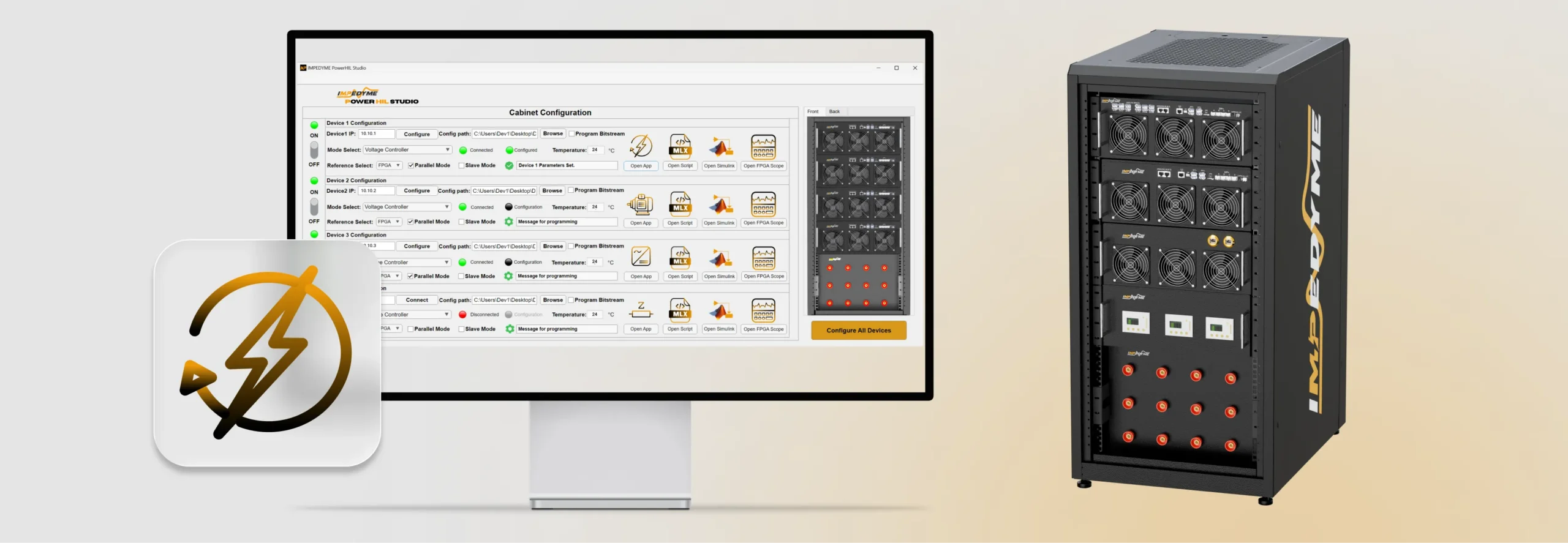
PowerHIL Studio opens into the Cabinet Configuration view — a single pane of glass that mirrors your physical test cabinet. Configure, program, and monitor every connected real-time target from one screen instead of juggling separate tools.
Network & connection status
Assign each device its own IP and connect with one click. Color-coded indicators show which units are connected, configured, and ready — and which still need attention.
Reference, parallel & slave modes
Select FPGA-based referencing and enable parallel or slave operation per device — gang multiple units for higher power or coordinate them in master–follower arrangements.
Live temperature monitoring
Real-time temperature readouts keep thermal conditions visible throughout long runs, adding a layer of operational safety before anything reaches full power.
Operating mode selection
A dropdown sets each device’s role, such as voltage controller mode, so the same hardware is repurposed across campaigns without rewiring or reprogramming from scratch.
Bitstream programming
Point each device to its config file, browse to a new bitstream, and program the FPGA directly from the dashboard — no separate toolchain required.
Configure all devices
Program and initialize every connected unit in a single operation — turning a device-by-device setup ritual into one step, which matters most in high-frequency regression testing.
Benefits and ROI for Test Teams
1
Shift validation earlier — catch issues in the lab, before prototypes and costly late surprises
2
Expand coverage safely — dangerous faults become repeatable scripts and overnight regressions
3
Cut cost with one toolchain — emulation replaces hardware, one model from simulation to PHIL
开源电力电子测试与仿真
Impedyme Power HIL Studio 引领了开源实时硬件在环(HIL)仿真在电力电子领域的发展。该平台专为从事开源电力电子研发的开发者和研究人员打造,提供了一个功能强大且可高度定制的解决方案,旨在简化开发流程并加速技术创新。

开源框架
适用于电力电子测试,使开发人员能够自定义并与开源项目集成——无需具备 FPGA 技能。

自动化工作流程
使用 MATLAB 脚本设置参数、运行测试扫描、捕获结果,并自动生成报告,无需人工干预。

实时 HIL 仿真
在 FPGA 或 CPU 上运行模型,可选择并行模式(提高功率)或从属模式(同步多单元测试)。

交互式控制
触发事件,动态调整信号,并实时监测结果,实现全面的测试灵活性。

电力电子仿真器
内置电网、电机、电池仿真和阻抗分析模块,支持科研与工业应用。

MATLAB/Simulink 集成
直接将 Simulink 模型导入并部署到硬件上,实时更新参数,加速测试周期。
FPGA-Based vs. Processor-Based Real-Time Simulation
| 方面 | Traditional Processor-Based HIL | Impedyme FPGA-Based HIL |
|---|---|---|
| Typical update rate | ~20–50 kHz | Simulation steps as fast as 1 µs; model updates near 90 ns (~11 MHz effective) |
| Computation model | Sequential instruction execution | Massively parallel logic |
| Processor-to-I/O path | Separated by a communication bus | Processing and I/O on the same chip |
| Timing determinism | Jitter from scheduling and interrupts | Fixed time steps, sub-microsecond low-jitter latency |
| PWM reproduction accuracy | Up to ~20% relative error at a 25 µs step (8 kHz PWM) | Under 1% error at a 1 µs step |
| Fast switching devices (SiC/GaN) | Often too slow to resolve switching transients | Optimized for Si, SiC, and GaN switching behavior |
| Suitability | Slower dynamics, general-purpose HIL | Power electronics with fast switching and unforgiving control loops |
Applications of Powerhil Studio

Electromobility and EV Powertrains

EV Charging

Battery Systems and BMS

Grid, Renewables, and HVDC

Aerospace and Drone

Data Center Power
常见问题
Ready to Build a Smarter Test Bench?
Discover how Impedyme PowerHIL Studio delivers real-time simulation, automated test campaigns, and FPGA-level precision.